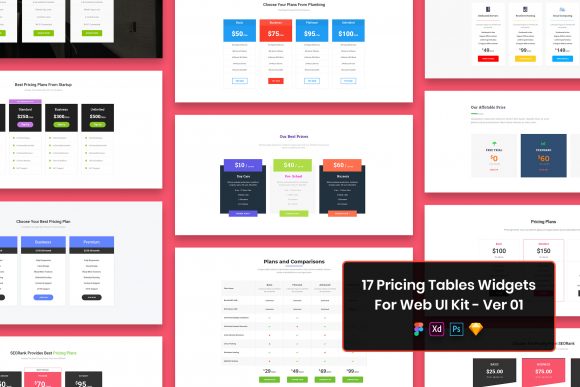
Streamline Web Design with 17 Pricing Tables
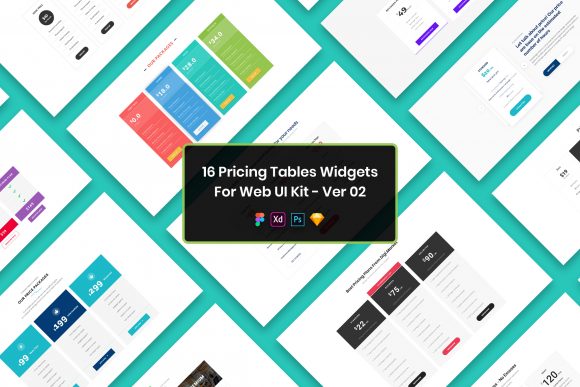
In the fast-paced world of web development and digital marketing, the pricing page is often the most critical juncture in the user journey. It is where interest converts into commitment, and where clarity directly influences revenue. For designers, developers, and business owners tasked with creating these essential interfaces, starting from a blank canvas can be an inefficient use of valuable time. The 17 Pricing Tables Widgets Web UI Kit offers a strategic solution to this common bottleneck, providing a robust foundation for building compelling, conversion-focused pricing structures without the need to reinvent the wheel.
This comprehensive resource is not merely a collection of static images; it is a functional design system tailored for modern workflows. Whether you are a freelancer managing multiple client projects, an in-house designer at a startup, or an entrepreneur launching a new SaaS product, the ability to rapidly prototype and iterate on pricing models is invaluable. By leveraging a pre-built kit that includes PSD, Figma, Sketch, and Adobe XD files, professionals can bypass the tedious setup phases and focus immediately on customizing the content to fit their specific brand voice and business logic.
Accelerating Workflow Across Multiple Design Platforms
One of the most significant advantages of this UI kit is its versatility regarding file formats. In the current design landscape, teams rarely standardize on a single tool. Some agencies swear by Figma for its collaborative capabilities, while others prefer the vector precision of Sketch or the extensive plugin ecosystem of Adobe XD. By including well-organized layers in all four major formats, this kit ensures that regardless of your preferred environment, you can integrate these widgets seamlessly into your existing workflow.
Consider a scenario where a marketing agency is pitching a new website redesign to a prospective client. The pitch needs to look polished and professional, but the timeline is tight. Instead of spending hours drawing rectangles, aligning text, and selecting color palettes for three different pricing tiers, the designer can import the 17 Pricing Tables Widgets directly into their working file. Because the files are easily editable and feature well-organized layers, changing a price point, swapping out a feature list, or adjusting the call-to-action button color takes mere seconds. This efficiency allows the creative team to dedicate more time to strategy and user experience rather than repetitive UI construction.
The Power of Minimal and Purposeful Design
A common pitfall in pricing page design is clutter. When businesses try to highlight every possible feature, they often overwhelm the potential customer, leading to decision paralysis. The minimal design philosophy embedded in this UI kit counters this tendency. Each widget is crafted with purposeful elements, ensuring that the hierarchy of information is clear. The most important data—usually the price and the primary value proposition—is given visual prominence, while secondary details are presented in a way that supports rather than distracts.
This approach is particularly beneficial for mobile responsiveness. A clean, minimal layout translates much better to smaller screens than a dense, complex table. Since the kit is pixel perfect and retina ready, designers can be confident that their tables will look crisp on high-density displays, from the latest smartphones to 4K monitors. This attention to detail reinforces brand credibility; a sloppy pricing table can inadvertently signal a lack of professionalism in the product itself.
Customization Without Compromise
While templates offer speed, they often suffer from a "cookie-cutter" feel if not properly adapted. The 17 Pricing Tables Widgets Web UI Kit addresses this by being fully customizable. The creative and professional design serves as a strong starting point, but it is not a rigid constraint. Users are encouraged to modify spacing, typography, and color schemes to align strictly with their brand guidelines.
For instance, a fintech startup might require a trustworthy, conservative blue palette with serif fonts to convey stability, whereas a gaming app might need vibrant gradients and bold sans-serif typefaces to exude energy. Because the kit utilizes free fonts, there are no licensing hurdles to clear before going live. The package includes a "Fonts Used" file with direct links, simplifying the asset management process. This transparency ensures that when the design moves from the mockup stage to actual code, the developer knows exactly which typefaces to implement, maintaining visual consistency across the board.
Practical Applications for Diverse Professionals
The utility of this UI kit extends beyond just web designers. Marketers can use these widgets to A/B test different pricing strategies quickly. By having 17 distinct variations, a marketer can swap out a "three-column" layout for a "single-feature highlight" layout to see which configuration drives more clicks. Small business owners who manage their own websites can utilize the editable files to update their service rates seasonally without needing to hire a designer for minor tweaks.
Educators and publishers offering subscription-based content can also benefit significantly. Presenting membership tiers clearly is essential for retention. These widgets provide structured ways to compare "Basic," "Pro," and "Enterprise" levels, making the upgrade path obvious and logical for the user. The widgets are designed to handle various content lengths, allowing for flexibility whether you are selling a simple ebook or a complex enterprise software suite.
Understanding Limitations and Asset Usage
To ensure realistic expectations, it is important to note the scope of the download. While the design files are comprehensive, the images, vectors, and mock-ups seen in the preview screenshots are for demonstration purposes only and are not included in the final package. This is a standard industry practice to protect the intellectual property of third-party asset creators. Users will need to source their own icons, photos, or illustrations to populate the tables. However, this limitation often proves to be a benefit, as it forces the integration of unique brand assets rather than relying on generic stock photography that competitors might also be using.
Furthermore, while the files are well-organized, users unfamiliar with layer structures in PSD or Figma may need a brief moment to orient themselves. It is recommended to duplicate the master components before making edits to preserve the original structure in case you need to revert changes. This precautionary step ensures that the integrity of the pixel perfect grid remains intact throughout the editing process.
Making the Right Choice for Your Project
Ultimately, the decision to use a UI kit like the 17 Pricing Tables Widgets Web UI Kit comes down to a balance of time, budget, and quality requirements. If you are building a highly experimental interface that defies conventional layouts, a custom-coded solution from scratch might be necessary. However, for the vast majority of standard business websites, e-commerce platforms, and landing pages, these widgets provide a superior alternative to manual design.
The value proposition is clear: you are trading a few dollars and a small amount of setup time for hours of design work and the assurance of a professionally structured layout. In an economy where speed to market can determine the success of a product launch, having access to four format files that are ready to deploy is a strategic asset. It allows teams to focus their cognitive energy on solving complex user problems and refining the overall narrative of their offer, rather than getting bogged down in the mechanics of drawing boxes and aligning text.
By integrating these tools into your design stack, you are not just saving time; you are elevating the standard of your output. The creative and professional design inherent in the kit ensures that your pricing presentation meets modern aesthetic standards, fostering trust and encouraging conversions. Whether you are a seasoned veteran or a hobbyist looking to polish your portfolio, this kit serves as a reliable bridge between concept and execution.