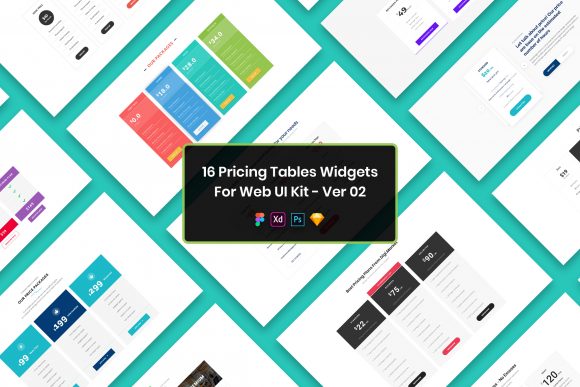
16 Pricing Tables Widgets Web UI Kit Overview
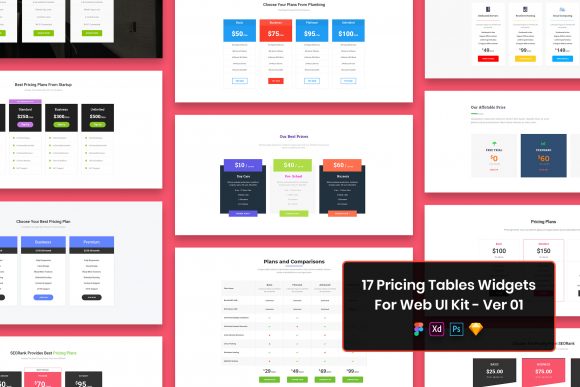
Designing a pricing page is often one of the most critical yet stressful parts of building a website. It is the point where interest converts into action, and the visual presentation needs to be flawless. The 16 Pricing Tables Widgets Web UI Kit offers a streamlined solution for this specific challenge, providing a collection of pre-designed interfaces that save time while maintaining high aesthetic standards. This kit includes files in PSD, Figma, Sketch, and Adobe XD formats, ensuring that regardless of your preferred design tool, you have access to well-organized layers and purposeful elements.
The value of such a resource changes significantly depending on who is using it. For a seasoned UI designer, this kit represents a shortcut that eliminates the tedious setup of grids and typography. For a small business owner with limited technical skills, it serves as a reliable foundation to present services professionally without needing to hire an agency. Understanding how different users interact with these assets helps clarify whether this toolkit aligns with your current project goals.
Why Structure Matters in Pricing Design
Pricing tables are not just lists of numbers; they are communication tools. They need to guide the user's eye toward the most valuable option while clearly distinguishing between tiers. A minimal design approach, which is central to this UI kit, helps reduce cognitive load. When customers are not overwhelmed by clutter, they can make decisions faster. The widgets included here focus on clarity, using whitespace and typography to create hierarchy rather than relying on heavy graphics or distracting colors.
The fact that these files are pixel perfect and retina ready ensures that the tables look crisp on everything from a mobile phone to a large desktop monitor. In an era where users judge credibility within seconds, a blurry or misaligned table can undermine trust. Having a base file that is already optimized for high-resolution screens removes a significant technical hurdle for creators at any level.
Perspectives for Different Users
The utility of the 16 Pricing Tables Widgets Web UI Kit shifts based on your role and experience level. Here is how various groups might evaluate and utilize these resources:
- Freelancers and Agencies: Time is money. For professionals managing multiple client projects, starting from scratch for every pricing page is inefficient. This kit allows them to import a file, swap out the text and branding colors, and deliver a polished result in a fraction of the time. The fully customizable nature of the layers means they can adapt the minimal design to fit a corporate law firm or a trendy startup without losing structural integrity.
- Entrepreneurs and Small Business Owners: Many founders wear many hats, including that of a designer. Without a background in graphic design, creating a balanced layout can be daunting. This kit provides a safety net. The well-organized widgets mean that even if you are not an expert in Figma or Adobe XD, you can navigate the file easily. You can focus on defining your service tiers and pricing strategy while the visual heavy lifting is already done.
- Beginners and Students: For those learning interface design, deconstructing professional files is one of the best ways to improve. By examining how the layers are grouped and how the purposeful elements are arranged, a novice can learn industry standards for spacing, font sizing, and alignment. The inclusion of four different file formats also offers a chance to explore different software ecosystems.
- Marketers and Bloggers: Content creators often need to monetize their platforms or promote affiliate products. A clean pricing table can be embedded into a landing page to highlight premium content or consulting packages. The creative and professional design ensures that the promotion feels native to the site rather than like an intrusive ad.
Technical Flexibility and File Formats
One of the strongest features of this kit is its compatibility. It includes source files for PSD, Figma, Sketch, and Adobe XD. This diversity acknowledges that the design community does not operate on a single platform. Some teams collaborate exclusively in Figma for its cloud capabilities, while others prefer the robustness of Photoshop for detailed image manipulation or Sketch for its lightweight performance on macOS.
Having access to all four formats future-proofs your workflow. If you switch tools next year, your assets remain usable. Furthermore, the files are described as having well-organized layers. In practical terms, this means elements are named logically, grouped appropriately, and easy to toggle on or off. This organization is crucial when you need to make quick adjustments, such as hiding a "Most Popular" badge or changing a currency symbol.
The kit also utilizes free fonts, which removes licensing barriers. You do not need to worry about purchasing expensive typefaces or dealing with legal restrictions when using the design commercially. Details regarding the specific fonts used are provided in a dedicated file within the download package, ensuring transparency and ease of implementation.
Practical Application Examples
To visualize how this kit fits into real-world scenarios, consider the following situations:
- The SaaS Launch: A software startup is preparing to launch a beta version. They need three tiers: Free, Pro, and Enterprise. Using the 16 Pricing Tables Widgets Web UI Kit, the lead designer selects a layout that highlights the Pro tier. They adjust the colors to match the brand identity and export the assets for the development team. The clean code structure implied by the organized design makes the handoff to developers smoother.
- The Freelance Portfolio: A graphic designer wants to list their package rates on their personal website. They need something that looks elegant but doesn't distract from their portfolio work. They choose a minimal widget from the kit, input their hourly rates and project bundles, and publish the page. The retina-ready graphics ensure their rates look sharp on potential clients' iPads.
- The Educational Course: An online educator is selling a video course. They need to compare a self-paced option versus a mentorship option. The clear visual distinction provided by the widgets helps students understand the value difference immediately. The educator can easily duplicate a widget to add a third "Group Coaching" tier without breaking the layout.
Evaluating Fit for Your Project
When deciding if this UI kit is right for you, consider your priorities. If your main goal is speed and you need to get a landing page live today, the pre-made nature of these widgets is a significant advantage. If your priority is learning, the organized structure offers a great study resource. If you value consistency across a large suite of products, having a standardized set of pricing tables ensures brand cohesion.
However, it is important to note the limitations regarding assets. All images, vectors, and mock-ups seen in the preview are for demonstration purposes only and are not included in the download files. This is a standard practice in UI kits to keep file sizes manageable and respect intellectual property rights. You will need to source your own icons or photos if the design calls for them, though the minimal nature of these tables often means they rely more on typography than imagery. Credits for any external inspiration belong to the respective authors.
Ultimately, the 16 Pricing Tables Widgets Web UI Kit is a tool designed to remove friction from the design process. Whether you are a hobbyist building a site for fun, a marketer optimizing a conversion funnel, or a professional designer delivering for a client, the core benefit remains the same: it provides a solid, professional foundation that allows you to focus on the content and strategy rather than the pixel-pushing.