Accelerating Healthcare Design Projects with a Modern Medical Web UI Kit
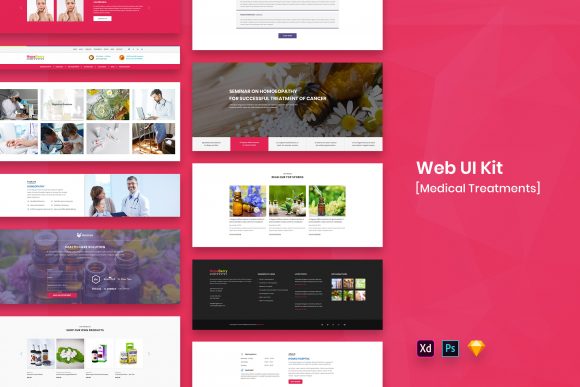
Designing for the healthcare industry carries a unique weight. Unlike building a landing page for a fashion brand or a portfolio for a photographer, medical web interfaces deal with trust, clarity, and often, urgency. When you are tasked with creating a dashboard for hospital administrators, a patient portal for booking appointments, or a telemedicine platform, the margin for error is slim. This is where leveraging a specialized Medical Web UI Kit transforms from a simple shortcut into a strategic necessity. These resources, available in modern formats like PSD, Figma, Sketch, and Adobe XD, provide a foundation of purposeful elements that allow designers to focus on user experience rather than reinventing the wheel.
The core value of a high-quality Web UI Kit Template lies in its ability to bridge the gap between concept and execution. In the fast-paced world of digital health startups and established clinic networks, time is often the most scarce resource. Imagine a scenario where a development team has two weeks to prototype a new symptom checker application. Starting from a blank canvas means spending days defining grid systems, selecting accessible color palettes, and drawing hundreds of icons for medical conditions. By utilizing a kit that offers well-organized layers and pixel-perfect components, a designer can skip the foundational grunt work. Instead, they can immediately begin arranging widgets, testing user flows, and refining the interaction design. The result is a prototype that looks professional and functions logically within hours rather than weeks.
Real-World Applications Across the Health Ecosystem
The versatility of a comprehensive Medical Web UI Kit extends far beyond a single type of project. Different stakeholders in the healthcare sector have vastly different needs, and a robust template accommodates this diversity through its variety of screens and elements.
Consider the private practice doctor looking to modernize their patient intake process. They need a clean, reassuring interface that guides elderly patients through digital forms without causing confusion. A minimal design approach, which is a hallmark of top-tier UI kits, ensures that typography is legible and navigation is intuitive. The "purposeful elements" included in these packages—such as pre-designed form fields, date pickers for appointment scheduling, and clear call-to-action buttons—are tailored for this exact use case. The designer doesn't have to guess what a "Book Appointment" button should look like; it's already there, retina-ready and fully customizable.
On the other end of the spectrum, health tech startups pitching to investors face a different challenge. They need to demonstrate a sophisticated, data-heavy dashboard that showcases real-time patient monitoring or complex analytics. Here, the widget libraries found in these kits become invaluable. Charts, graphs, and data visualization components are often pre-styled to maintain visual consistency while handling dense information. Because the files are easily editable, a designer can tweak the color scheme to match the startup's branding instantly. Whether the brand identity relies on calming blues and greens or bold, energetic accents, the underlying structure of the UI kit supports rapid iteration.
Benefits for Freelancers vs. In-House Teams
The utility of these tools shifts slightly depending on who is using them. For a freelance designer juggling multiple clients, a Medical Web UI Kit acts as a force multiplier. It allows them to take on projects they might otherwise decline due to tight deadlines. If a client needs a telemedicine app interface by Friday, having a library of 4 formats (PSD, Figma, Sketch, Adobe XD) ensures compatibility regardless of the freelancer's preferred tool or the client's handoff requirements. The well-organized layers mean that handing off the design to a developer is seamless; the code-ready structure reduces back-and-forth questions about spacing or font sizes.
For in-house design teams at larger hospitals or insurance companies, consistency is the primary goal. When ten different designers are working on various modules of a massive patient portal, the visual language can easily fracture. Adopting a single, professional Web UI Kit Template establishes a unified design system. Everyone pulls from the same set of buttons, cards, and navigation bars. This not only speeds up production but also ensures that the end-user experiences a cohesive journey, whether they are viewing a billing statement on a desktop or checking lab results on a mobile device. The inclusion of free fonts and retina-ready assets further guarantees that the final product looks sharp across all devices without requiring additional licensing budgets.
Navigating Limitations and Customization
While the advantages are significant, approaching a Medical Web UI Kit with a critical eye is essential. These templates are starting points, not finished products. One common consideration is the balance between the template's aesthetic and the specific accessibility requirements of the healthcare sector. While a kit may offer a "minimal design," healthcare applications often require higher contrast ratios and larger touch targets to accommodate users with visual impairments or motor control issues. Designers must be prepared to modify the provided elements to meet WCAG (Web Content Accessibility Guidelines) standards. The fact that these files are "fully customizable" is crucial here; it empowers the designer to adjust font weights, increase padding, or alter color contrasts without breaking the layout.
Another practical observation involves the imagery. Most premium UI kits, including those focused on medical themes, use images and vectors for preview purposes only. As noted in standard documentation, these mock-ups are not included in the download files. This is a standard industry practice to respect copyright, but it means the designer must source their own photography. In the medical field, authentic imagery is vital. Stock photos of smiling doctors can sometimes feel generic or staged. A smart approach is to use the kit's layout structures as frames for genuine photos of the client's actual staff and facilities. This blends the professional structure of the template with the authentic trust-building power of real human connection.
The Importance of Organization and Workflow
The true test of a good UI kit is how it handles complexity. A project might start with five screens but quickly grow to fifty. If the layers are messy, the file becomes unmanageable. High-quality kits pride themselves on "well-organized layers." This isn't just a nice-to-have feature; it is a workflow saver. When you open a Figma or Sketch file and find groups named logically (e.g., "Header," "Patient Card," "Footer") rather than "Group 452," you save hours of frustration. This organization facilitates collaboration. A junior designer can jump into the file and understand the hierarchy immediately, while a senior designer can make global changes efficiently.
Furthermore, the availability of multiple formats ensures future-proofing. The design industry evolves rapidly; today everyone might be using Figma, but tomorrow a team might switch to Adobe XD or require legacy PSD files for specific marketing assets. Having a kit that covers all bases protects your investment and ensures you aren't locked into a single software ecosystem. It allows agencies to service a broader range of clients without needing to purchase separate assets for each tool.
Ultimately, integrating a Medical Web UI Kit into your workflow is about respecting the user's time and the designer's creativity. It removes the friction of repetitive tasks, allowing the human element of design—empathy, problem-solving, and storytelling—to take center stage. Whether you are building a simple clinic website or a complex health monitoring system, these templates provide the structural integrity needed to build something great, leaving you free to focus on the details that truly matter to patients and providers alike.