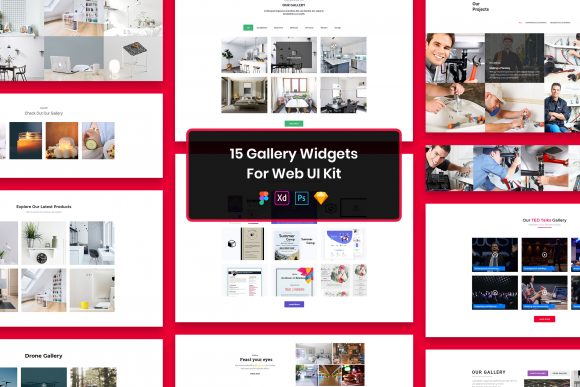
Explore 15 Gallery Widgets for Web UI Kit
Building a website often feels like assembling a complex puzzle where every piece needs to fit perfectly to create a cohesive picture. For many, the most challenging part of this process is designing specific components that look professional without consuming weeks of development time. This is where a resource like the 15 Gallery Widgets for Web UI Kit becomes invaluable. It is not just a collection of images; it is a structured set of design elements crafted to streamline the workflow for anyone creating digital interfaces. Whether you are launching a portfolio, building an e-commerce site, or simply learning how to design, having access to pre-made, high-quality widgets can shift your focus from tedious construction to creative problem-solving.
At its core, this kit provides fifteen distinct gallery layouts designed to showcase visual content effectively. Galleries are essential for displaying photography, product lines, project case studies, or team members. However, designing them from scratch requires a keen eye for spacing, alignment, and responsiveness. This kit solves that by offering minimal design principles that ensure the content remains the hero. The files are delivered in four major formats: PSD, Figma, Sketch, and Adobe XD. This multi-format approach ensures that regardless of your preferred software ecosystem, you can integrate these assets immediately. Furthermore, the layers within these files are well-organized, meaning you aren't digging through a mess of unnamed groups to find the element you need to adjust.
Why Different Users Value This Kit Differently
The utility of a design kit changes significantly depending on who is holding the mouse. A seasoned UI designer looks for different attributes than a small business owner trying to mock up a new landing page. Understanding these varying perspectives helps you decide if this tool aligns with your current objectives.
For beginners and students, the primary value lies in education and speed. When you are just starting, staring at a blank artboard can be paralyzing. By opening the 15 Gallery Widgets for Web UI Kit, a novice can deconstruct how a professional layout is built. They can see how grids are applied, how typography interacts with images, and how whitespace is utilized to create balance. The fact that the files are easily editable allows them to experiment safely. They can change colors, swap fonts, or rearrange elements to see what happens without fear of breaking a live site. For this group, the kit serves as both a shortcut and a textbook.
Professional designers and freelancers, on the other hand, often prioritize efficiency and customization. Their time is billable, and spending hours drawing basic grid lines for a photo gallery is rarely the best use of their skills. They need tools that are pixel perfect and retina ready so they can deliver high-fidelity mockups to clients quickly. The inclusion of multiple file formats means a freelancer working with a client who uses Sketch can seamlessly switch to a developer who prefers Figma without needing to convert files manually. For professionals, the "well-organized layers" feature is critical; it allows for rapid iteration during client presentations. If a client wants to see a different arrangement, the designer can toggle visibility or move groups instantly.
Practical Applications Across Industries
The versatility of gallery widgets extends beyond simple photo displays. Different industries leverage these components to solve unique communication challenges.
- Photographers and Creatives: For those whose work is purely visual, the gallery is the entire website. They need layouts that support high-resolution imagery without clutter. The minimal design of this kit ensures that the interface recedes, letting the photography stand out. The retina-ready nature of the files guarantees that details remain crisp on modern high-DPI screens.
- E-commerce Entrepreneurs: Online store owners need to showcase products in a way that drives sales. A well-structured gallery can highlight product variations, lifestyle shots, or user-generated content. Using these widgets, a marketer can quickly prototype a "New Arrivals" section or a "Customer Favorites" grid to test which layout converts better.
- Corporate Teams and Educators: Even non-creative sectors benefit from visual organization. HR departments might use these widgets to design an internal "Meet the Team" page, while educators could use them to create a portfolio of student work or a gallery of campus facilities. The clean aesthetic ensures the presentation remains professional and accessible.
Evaluating Quality and Flexibility
When considering any design asset, the balance between structure and flexibility is paramount. Some kits are so rigid that they force your content into a box that doesn't fit. Others are so loose that they offer no real guidance. The 15 Gallery Widgets for Web UI Kit aims for a middle ground. The designs are fully customizable, allowing you to adapt the framework to your brand identity. You can swap out the placeholder images for your own vectors or photos, and because the fonts used are free, there are no licensing hurdles to clear before going live. The package includes a "Fonts Used" file with links, ensuring you can replicate the exact typography or choose suitable alternatives if needed.
It is important to note what is not included to manage expectations correctly. All images, vectors, and mock-ups seen in the preview files are for demonstration purposes only. They are not part of the download. This is standard practice in the industry to respect the intellectual property of the original creators of those assets. The value you are purchasing is the purposeful elements and the structural design of the widgets themselves, not the stock photography used to fill them. This distinction is crucial for commercial users who must source their own compliant imagery for final projects.
Making the Right Choice for Your Project
Deciding whether to adopt this kit comes down to your specific constraints and goals. If you are a hobbyist building a personal blog, the cost-effectiveness and ease of use make it an attractive option. You get a professional look without needing to hire a designer. If you are a marketing agency pitching a new concept, the speed of deployment allows you to visualize ideas during the strategy phase rather than waiting for the development cycle.
However, if your project requires highly unconventional interactions or complex animations that deviate significantly from standard grid layouts, you might find the minimal nature of these widgets too restrictive. They are designed for clarity and efficiency, not for avant-garde experimentalism. For most standard web applications, portfolios, and business sites, though, they provide a robust foundation.
Ultimately, the 15 Gallery Widgets for Web UI Kit represents a practical investment in your workflow. It acknowledges that while creativity is infinite, time and resources are not. By providing a reliable set of tools across all major design platforms, it empowers users to focus on what matters most: telling their story through great content. Whether you are tweaking a single layer in Photoshop or collaborating in real-time on Figma, these widgets offer a solid starting point that respects both your skill level and your ambition.